· Updated · Matt Ballek · 7 min read
OpenAI Sol, Terra, and Luna, Mattsplained
GPT-5.6 Sol, Terra, and Luna share the same big context window and tools, but they make very different tradeoffs between intelligence and cost.
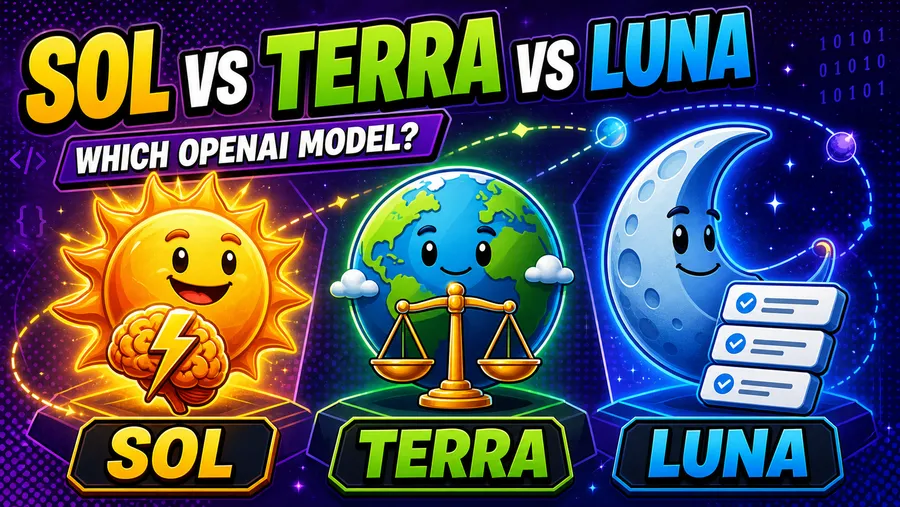
When I read OpenAI’s announcement for Sol, Terra, and Luna, I felt like I was unsuccessfully playing the New York Times game Connections.
I could see that the names belonged together. I just did not know what I was supposed to do with them.
Then I got the planet-size comparison.
Sol is the big one. Terra sits in the middle. Luna is the smallest and least expensive. You do not need to throw the power of the sun at every problem.
That was enough for the new GPT-5.6 lineup to click for me:
- Sol is built for the hardest reasoning, coding, and professional work.
- Terra balances intelligence and cost.
- Luna is designed for repeatable, high-volume work where cost matters.
The model names are much easier to remember once you understand that basic scale. Choosing between them still takes a little more thought.
Quick comparison
| Model | Best for | Input price | Output price |
|---|---|---|---|
| GPT-5.6 Sol | Difficult reasoning, coding, and high-stakes professional work | $5 per million tokens | $30 per million tokens |
| GPT-5.6 Terra | Everyday product features that need a strong balance of quality and cost | $2.50 per million tokens | $15 per million tokens |
| GPT-5.6 Luna | Cost-sensitive, high-volume, and more predictable workloads | $1 per million tokens | $6 per million tokens |
Those are API prices from OpenAI’s current model catalog. ChatGPT plans and usage limits are separate.
All three models support text and image input, text output, vision, multilingual work, and the same core tools: functions, web search, file search, and computer use. They also share a 1.05 million-token context window, a 128,000-token maximum output, and a February 16, 2026 knowledge cutoff.
They share plenty of technical features. The choice mostly comes down to how difficult the job is and how much you want to spend running it.
GPT-5.6 Sol: bring out the big brain
Sol is OpenAI’s flagship GPT-5.6 model for complex professional work. I would reach for it when a weaker answer could create more work than it saves.
That could mean planning a complicated feature across a large codebase or debugging a problem with several possible causes. Architecture reviews, security-sensitive changes, and research with messy or conflicting requirements also fit here.
Sol was actually unavailable when I first tried to use it on Vibe Code with Matt. Overall demand had temporarily limited access. This happened around the same time as the debacle over access to Anthropic’s most powerful model, so I was already thinking about how dependent these workflows can be on model availability.
Having a most-powerful option does not mean you can always use it. You may not even need it.
Sol’s API input and output prices are twice Terra’s and five times Luna’s. I would save that extra power for work where I can explain why it is worth the extra cost.
GPT-5.6 Terra: the everyday default
Terra is the middle option, and it ended up writing the initial draft of this post.
I asked it to research and explain all three models, organize the article, and create a hero image that matched the rest of this site. That is no small order for one task.
The article organization impressed me. The first draft was useful and taught me a few things about the prices and where each model fits. The hero image also looked like it belonged here.
Everything worked locally, so I pushed the changes to my main branch. The page was live in under a minute.
The copy needed another pass. It leaned on a lot of familiar AI writing habits, including forced contrasts and neatly arranged lists that always seemed to save a joke for item three. The substance and the finished page were still strong.
That experience gives me a real reason to recommend Terra as a starting point. It handled research, writing, image creation, and work inside an existing website. Terra costs half as much as Sol while keeping the same context window, maximum output, reasoning settings, and listed tools.
I would try it first for most normal product features, coding tasks with clear requirements, and content work like this. If the results are not strong enough, then I would move the task to Sol.
GPT-5.6 Luna: small price, lots of laps
Luna is optimized for cost-sensitive work you need to run over and over.
I plan to use it here to help keep tool news and updates current. That workflow will involve checking lots of small pieces of information on a regular schedule. Each individual update should be fairly narrow, so paying Sol prices for every check would be hard to justify.
Other good fits include categorizing large batches of content, extracting known fields from consistent documents, and generating simple variations from a stable template.
Luna costs one-fifth as much as Sol through the API: $1 per million input tokens and $6 per million output tokens.
I still plan to test the work before trusting it. Lower model costs only help when the output is reliable enough to use.
What the three models have in common
All three belong to the GPT-5.6 family and have a 1.05 million-token context window with up to 128,000 output tokens. They accept text and images and support vision and multilingual work.
OpenAI also lists the same tools for each model: function calling, web search, file search, and computer use. Their reasoning settings run from none through max.
This should make it easier to test the same workflow with different models. If Luna struggles with a task, you can try Terra or Sol without designing the whole feature again around different context limits or tool support.
Which OpenAI model should you choose?
I would start with Terra for most new projects.
My first experience with it showed that the middle model can handle a substantial task. It also gives you room to move in either direction after you see the results.
Use Sol when the work requires deeper reasoning, the consequences of an error are expensive, or you keep correcting Terra by hand.
Try Luna when the task is narrow, repeatable, and easy to evaluate. It becomes especially interesting when you need to process a lot of requests and Terra does not produce meaningfully better results.
One project may eventually use all three. Luna can handle routine checks, Terra can do the regular work, and Sol can take the difficult cases. OpenAI calls this model routing.
A simple way to test them
The best comparison will come from your own project.
Collect 20 to 50 examples from the actual job, including a few edge cases. Run the same prompt and settings with each model. Review the results for correctness, usefulness, consistency, speed, and cost.
Pay attention to where the less expensive models fail. Average scores can hide the one kind of mistake that causes a real problem in your app.
Choose the least expensive model that reliably meets your quality bar. My Terra-built first draft is a decent example. The page, research, organization, and image were good enough to publish after testing. The writing style still needed me.
The bottom line
The planet sizes are a useful shortcut.
Sol has the most power and the highest price. Terra is the strong middle option. Luna is the economical model for smaller jobs at scale.
I would begin with Terra for most new projects. I already know it can produce a complete, useful result on this site. I plan to test Luna on routine tool-news updates and keep Sol available for the work that clearly needs it.
You do not need to throw the power of the sun at every problem.